Curating MAGs with anvi'o
metaTOR's clusters can keep some contamination, more so when the assembly keeps small contigs. anvi'o removes it by hand, from the coverage and sequence composition of the contigs. This page goes from metaTOR to anvi'o and back; see anvi'o's tutorial on refining bins for the refinement itself.
The commands are for anvi'o 7. They use the output directory binning of a
pipeline run on the map of two libraries, L1 and L2, each made with
hicstuff pipeline -M metacool -n (see
Other tools): -n keeps the
alignments, which give the coverage. The tables are in binning/tables
(after a run step by step, metator dump binning/sample.metacool -o
binning/tables writes them).
1. The contigs database
The database holds the contigs of the final clusters, listed in
binning.txt, with their records in fasta/mags_with-mges/. This is a run
without --mges: with it, binning.txt also lists the MGE genomes, whose
contigs are in fasta/mges/.
mkdir -p anvio
cut -f 1 binning/tables/binning.txt > anvio/contigs.txt
cat binning/fasta/mags_with-mges/*.fa > anvio/contigs.fa
anvi'o only accepts contig names of ASCII letters, digits and underscores:
rename the contigs before the run if needed (see its
note on FASTA files).
Build the database without splitting the contigs (-L 0), then find the
single-copy genes:
anvi-gen-contigs-database -f anvio/contigs.fa -o anvio/contigs.db -n metator -L 0 -T 16
anvi-run-hmms -c anvio/contigs.db -T 16
Optional annotations that help curation:
anvi-setup-scg-taxonomy                    # once
anvi-run-scg-taxonomy -c anvio/contigs.db -T 16
anvi-setup-ncbi-cogs                       # once
anvi-run-ncbi-cogs -c anvio/contigs.db -T 16 --sensitive
anvi-display-contigs-stats anvio/contigs.db
2. The coverage profiles
Profile each library on its own (shotgun libraries can be added the same
way). hicstuff -n keeps the alignments of each mate in its temporary
directory (<outdir>/tmp by default), <prefix>.for.bam and <prefix>.rev.bam;
anvi-init-bam sorts and indexes them. The first mates are enough:
for lib in L1 L2; do
    anvi-init-bam hicstuff_${lib}/tmp/${lib}.for.bam -o anvio/${lib}.bam
    anvi-profile -i anvio/${lib}.bam -c anvio/contigs.db -o anvio/HiC_${lib} -S HiC_${lib} \
        -M 500 -T 16 --skip-hierarchical-clustering --skip-SNV-profiling \
        --contigs-of-interest anvio/contigs.txt
done
anvi-merge -c anvio/contigs.db -o anvio/merged -S HiC -W anvio/HiC_*/PROFILE.db
--skip-hierarchical-clustering defers clustering to refinement,
--skip-SNV-profiling saves much time, and -M 500 keeps the contigs of
500 bp or more.
3. The clusters of metaTOR
binning.txt is an anvi'o collection, a contig and its cluster per line:
anvi-import-collection binning/tables/binning.txt -c anvio/contigs.db -p anvio/merged/PROFILE.db \
    -C metator --contigs-mode
4. Refining the clusters
anvi-refine opens a cluster in anvi'o's interactive interface, in a web
browser:
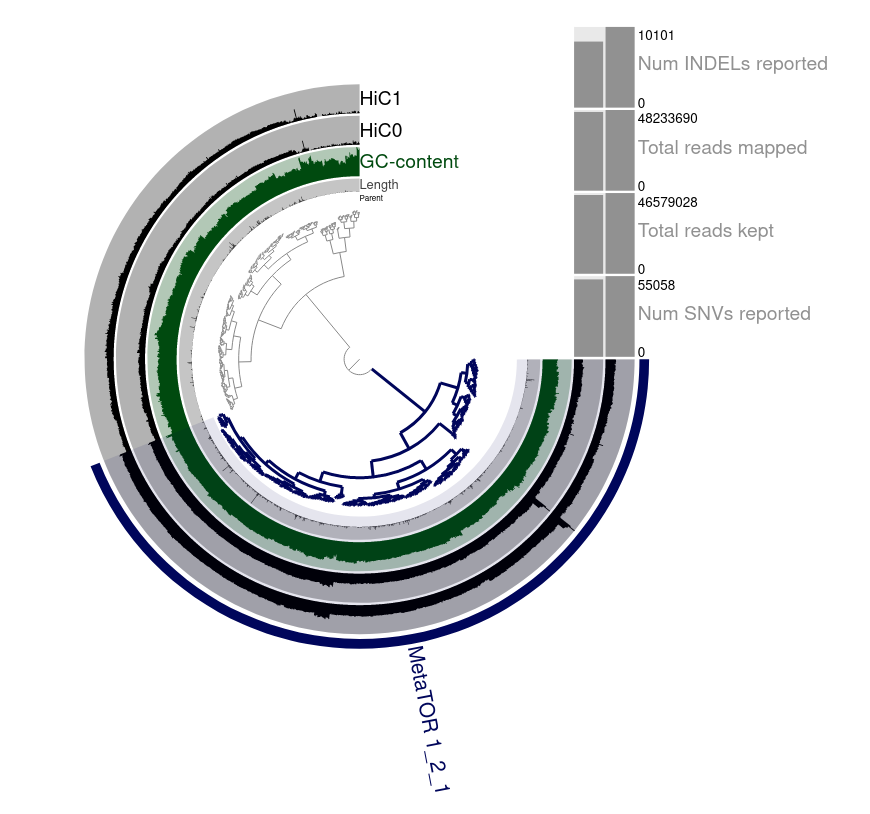
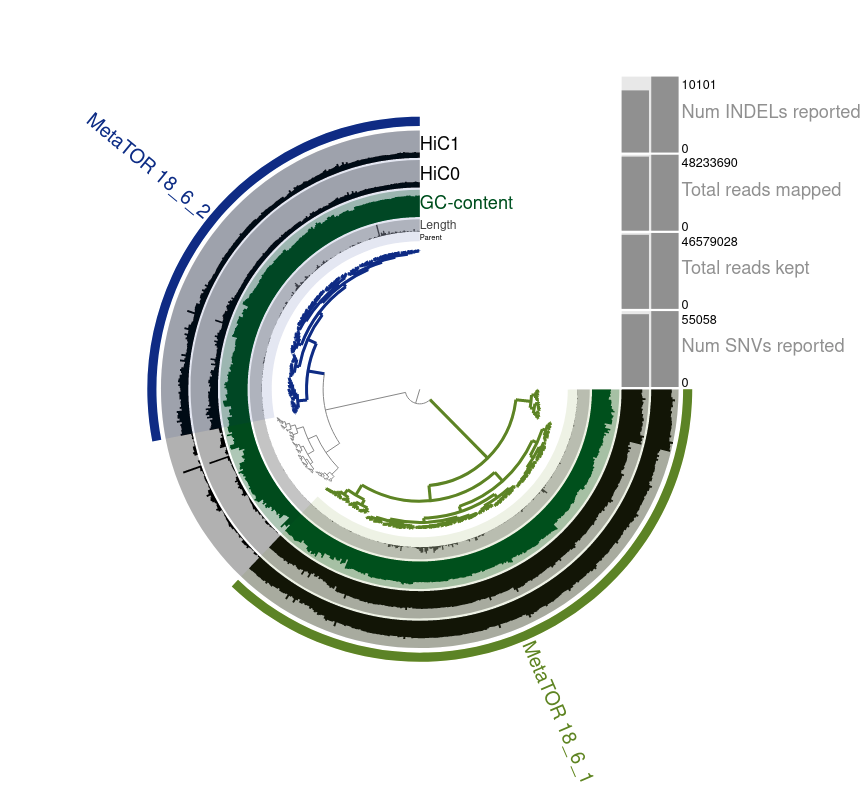
Two clusters of a human gut sample: the first cleaned of its contamination, the second split in two.
| A cluster cleaned | A cluster split in two |
|---|---|
 |
 |
| Cluster | Before: completeness – contamination (%) | After |
|---|---|---|
| Cleaned | 97.2 – 19.7 | 95.8 – 9.9 |
| Split | 95.8 – 98.6 | 94.4 – 0.0, and 93.0 – 0.0 |
5. The curated clusters
Export the collection, a contig (split) and its cluster per line:
Then, in Python, write one FASTA file per curated cluster, check them with
miComplete as metator validation does, count them by quality class, and
draw the quality plots of the run:
import metacooler
import metator.figures as mtf
import metator.validation as mtv
import pandas as pd

# The collection exported by anvi'o: each split and its cluster, a split read
# as its contig (NODE_1_split_00001 is NODE_1).
collection = pd.read_csv("anvio/curated.txt", sep="\t", header=None, names=["split", "cluster"], dtype=str)
binning = collection.set_index(collection["split"].str.split("_split").str[0])["cluster"]
binning = binning[~binning.index.duplicated(keep="last")]

# One FASTA file per curated cluster, written by metacooler from the map of the run.
groups = {bin_name: list(contigs.index) for bin_name, contigs in binning.groupby(binning)}
metacooler.write_fasta("binning/sample.metacool", "assembly.fa", "anvio/fasta", groups=groups)

# miComplete on every cluster, with the bacterial and the archaeal markers.
mtv.micomplete_quality("anvio/fasta", "anvio/micomplete.txt", threads=16)

# The quality class of each curated cluster (HQ, MQ, LQ, Contaminated, Other).
summary = pd.read_csv("anvio/micomplete.txt", sep="\t", comment="#", index_col=0)
quality = summary.apply(lambda row: mtv.bin_quality(row["Weighted completeness"], row["Weighted redundancy"]), axis=1)
print(quality.value_counts())

# The quality plots of the validation, for the curated clusters.
total = int(metacooler.MetaCooler("binning/sample.metacool").contigs["length"].sum())
mtf.figures_bins_distribution(summary, "anvio/bins_distribution.pdf")
mtf.figures_bins_size_distribution(summary, total, 500000, "anvio/bins_size_distribution.pdf")
Compare them with those in binning/plots/, from before the curation.
For the contacts of a curated cluster, add the curated clusters to the
contig data table, regroup the map with metacooler reassign, then extract
a cluster with metacooler extract (see Other tools):
# binning: the curated cluster of each contig, read from the collection as above.
contigs = pd.read_csv("binning/tables/contig_data_final.txt", sep="\t", dtype={"Name": str})
contigs["Anvio"] = contigs["Name"].map(binning).fillna("ND")
contigs.to_csv("binning/contig_data_anvio.txt", sep="\t", index=False)